
Copy reviewed templates for policies, risks, tasks, and other ISMS entries, then adapt them to your organization.
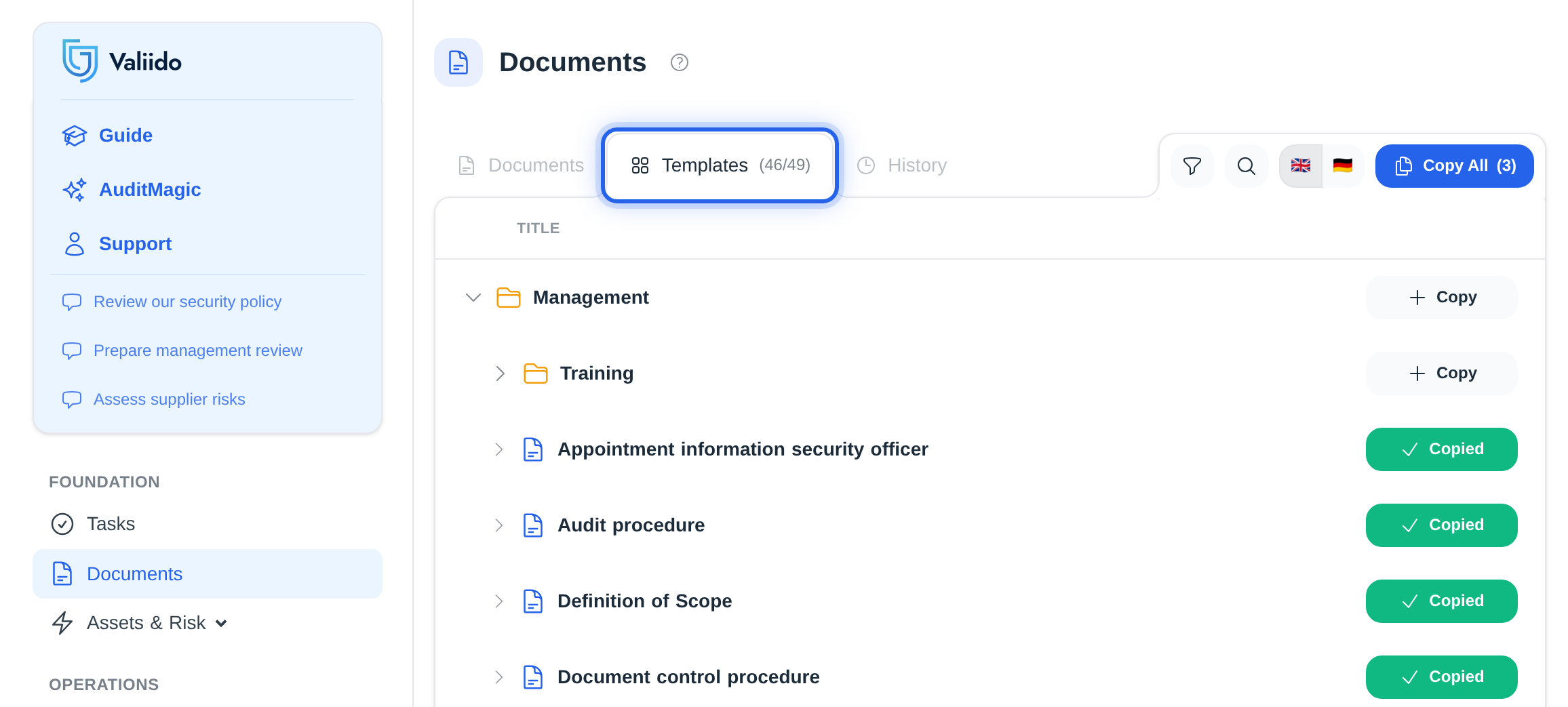
Find a template
Nearly all areas offer templates, including Documents, Risks, Tasks, and Vendors.
- Open the area’s Templates tab.
- Search with or use to filter by copy status.
- Select a row to read the template.
Use the flags to choose the template language. Valiido remembers your choice.
Copy a template
- Select Copy next to the template.
- Alternatively, select Copy All for all uncopied templates in the list.
- Edit the copy in the first tab, such as Documents.
Document templates include their folders. Copied tasks have no assignee. Their recurrence interval sets the due date.
Copy and original
Changes to your copy do not affect the template and vice versa.
- Open the copy and hover over the clock under Date.
- Follow the “From template” link with the template title to open the original.
Common questions
Where do I find a specific template?
Under Templates in the relevant area. Look under Documents for policies and forms or under Risks for risks. Guide tasks link directly to the template you need.
Do I have to adapt the template?
Yes. Your ISMS must describe your organization. The Guide recommends copying and adapting each template as you work through its chapter. You can delete the hints in the blue boxes.
I copied the template in the wrong language. What now?
Switch languages using the flag. Hover over Copied and select Copy again.
Are the templates updated?
Yes. Valiido posts updates in the Templates tab. Your copies stay the same.